Breaking News
Showing posts with label Linux Others. Show all posts

Friday, April 25, 2014

‘Iris’ Is a Stylish Flat GTK Theme


Iris light gtk theme
Iris, in both its light and dark variants, is nothing if not on-trend. It adheres to the (increasingly clichéd, but still good looking) use of “flat” elements coupled with just a splash of a bold accent colour.
IRIS Dark GTK Theme for Linux
It’d be easy to compare it to Windows’ Modern UI or Apple’s iOS 7, but since neither OS has dibs on the minimal style, they merely popularised it, it’s an association that would undermine the effort and attention put into Iris by its author.
Both Iris Light and Iris Dark support Gtk 3.10 (including GNOME’s natty new header bars), Gtk 2 (using the Murrine engine), and elementary’s Granite. A Metacity window theme is also included.

Don’t Freak Out But It’s In Beta

If there’s a drawback to be had it’s that both themes are still in ‘beta‘. Yes, that means if you’re prone to table-flipping over minor inconsistencies or issues you will want to give it a miss.
For everyone else (read: the serene and sensible amongst you) Iris can give your desktop a dramatic overhaul. To try it out jump on over to DeviantArt using the links below, then install to your local theme folder and apply using an app like Unity Tweak Tool.
Don’t forget to let us know what you think of it in the comments. Any bugs you find can be reported on the project’sGitHub page.
Read more ...

Upcoming Features of GNOME 3.14

GNOME (GNU Network Object Model Environment) is a desktop environment which is composed entirely of free and open-source software.


This is a list of new features planned for the upcoming Gnome 3.14 release.


Browse DLNA Media Servers in GNOME Photos

With this, Gnome want to turn GNOME Photos into a Digital Media Player that can browse DMSes on a local network.

Integrate PicasaWeb in GNOME Photos

GNOME Photos currently has support for Flickr and Facebook photos. Gnome plan to add PicasaWeb to the list of supported services.

Systemd for the user session

Gnome can use systemd to manage parts of the user session. This allows gnome-shell to do application matching more reliably.

Colour Tinting in GNOME Shell

Certain vision and cognitive problems are accommodated by tinting the view. The GNOME Shell magnifier has this functionality, but lacks a user interface.

Integrate Zimbra in GNOME
Zimbra is a groupware and email server that has a free software edition. Gnome plan to offer IMAP/SMTP, CalDAV and CardDAV to Evolution.

Gnome 3.14 will be released in September 2014.
Read more ...

Wednesday, April 23, 2014

How has the Press Reacted to Ubuntu 14.04?


ubuntu-desktop
Ubuntu 14.04 LTS Desktop
The release of Ubuntu 14.04 just before the Easter holiday arrived gave tech journalists and bloggers an extended period in which to play with the newest long-term support release.
But what did they make of it?

Press Reaction

The last few years have seen each successive release of Ubuntu greeted by fewer and fewer pixels (as opposed to column inches).
As an LTS, the recommended choice for home users and enterprise deployments alike, does 14.04 buck the trend?
‘Reviews from mainstream tech publications and news site are once again thin on the ground.’
In short: not really. Reviews from mainstream tech publications and news site are once again thin on the ground. Whether it’s that this release has little newsworthy to offer (outside of extended support and a few extras that only enthusiasts are likely to care about) or whether there’s an increasing weariness about covering an established product that has, by and large, remained a niche interest is not for me to postulate.
But while there’s no mention of the Trusty Tahr on the BBC News website or in the technology section of The Guardian, it didn’t arrive totally unnoticed. What press reaction there has been, has been positive.

Quote, Unquote

ZDNet offers up a detailed overview, describing the release as “solid and stable”. While noting that it features ‘no big changes’ the reviewer, Terry Ralph-Knight, goes on to declare Ubuntu as being “pretty hard to beat”. 
‘Terry Ralph-Knight of Zdnet declares Ubuntu 14.04 LTS as ‘hard to beat”
Over at TechRepublic Jack Wallen, in his concise overview, says Trusty ‘wows through subtlety‘.
Jon Gold of Network World conveys the salient changes with a slideshow. On the subject of improved HiDPI support Gold notes that this “could prove important as 4K screens begin to gain traction in the market.”
Tech site The Inquirer covers the release from the ‘Windows XP Alternative’ angle, but noted it is a ‘natty bit of kit in its own right’.
‘Other coverage tended to regurgitate the official Canonical press release’
Other coverage tended to regurgitate the Canonical press release that trumpets the lure for Windows XP users and businesses; touts the ‘optimised for multi-touch trackpads and touchscreen’ angle; and touches on the co-release of new 14.04-based tablet and phone builds.
Of these, Engadget and PCAdvisor cover the above points concisely, while Jon Brodkin of Ars Technica distills the essentials points in depth with added insight from an email conversation he had with Rick Spencer, VP of Engineering at Canonical.
The decision to refer to Ubuntu Touch as merely ‘Ubuntu’ (something that while technically true forgoes a distinction still warranted) confused a few reporters, with many inferring that the screenshots of the desktop version accompanying their articles is what will be shipping on tablets later this year.
As we have previously reported, the ‘Unity 8′-based version of Ubuntu will be sold preinstalled on tablets from unknown OEMs later this year.
In all the reception has been positive, if a little lacking. But what critics think matters not a jot — it’s you, the user whose opinion is the true decider. Have you upgraded yet?
Read more ...

Sunday, October 20, 2013

Gnome-Shell Refined Is the First GNOME 3.10 Theme and It Looks Amazing


Gnome-Shell Refined 3.10 is probably the first theme made specifically for GNOME 3.10, and it looks great.


I say probably because it's hard to search the entire Internet for a GNOME 3.10-compatible theme, and my search hasn't been fruitful.

In any case, Gnome-Shell Refined 3.10 is a beta release and, as the name suggests, it only applies to GNOME Shell. It doesn't have any particular icons associated with it, but it makes the operating systems a lot classier.

“This is a beta state of a theme I made for my Gnome Shell. It is a Mixture of the VIVA-theme, the Elementary-Mod theme and the standard Shell theme.”

“All honors go to the makers of the themes mentioned above, I just mixed all! Because I'm using Numix GTK very often, the Item-Activated color is a kind of orange,” stated the developer.

You can download the theme from gnome-look.org.
Read more ...

First Look at Cinnamon 2.0 on Arch Linux

After approximately five months of development, the final version of the highly anticipated Cinnamon 2.0 desktop environment, created by the people behind the popular Linux Mint operating system, has finally arrived today, October 10, 2013.


Cinnamon 2.0 is fully packed with brand new features, lots of improvements, and numerous bug fixes, which will definitely make users upgrade from the old and deprecated Cinnamon 1.8 desktop environment.


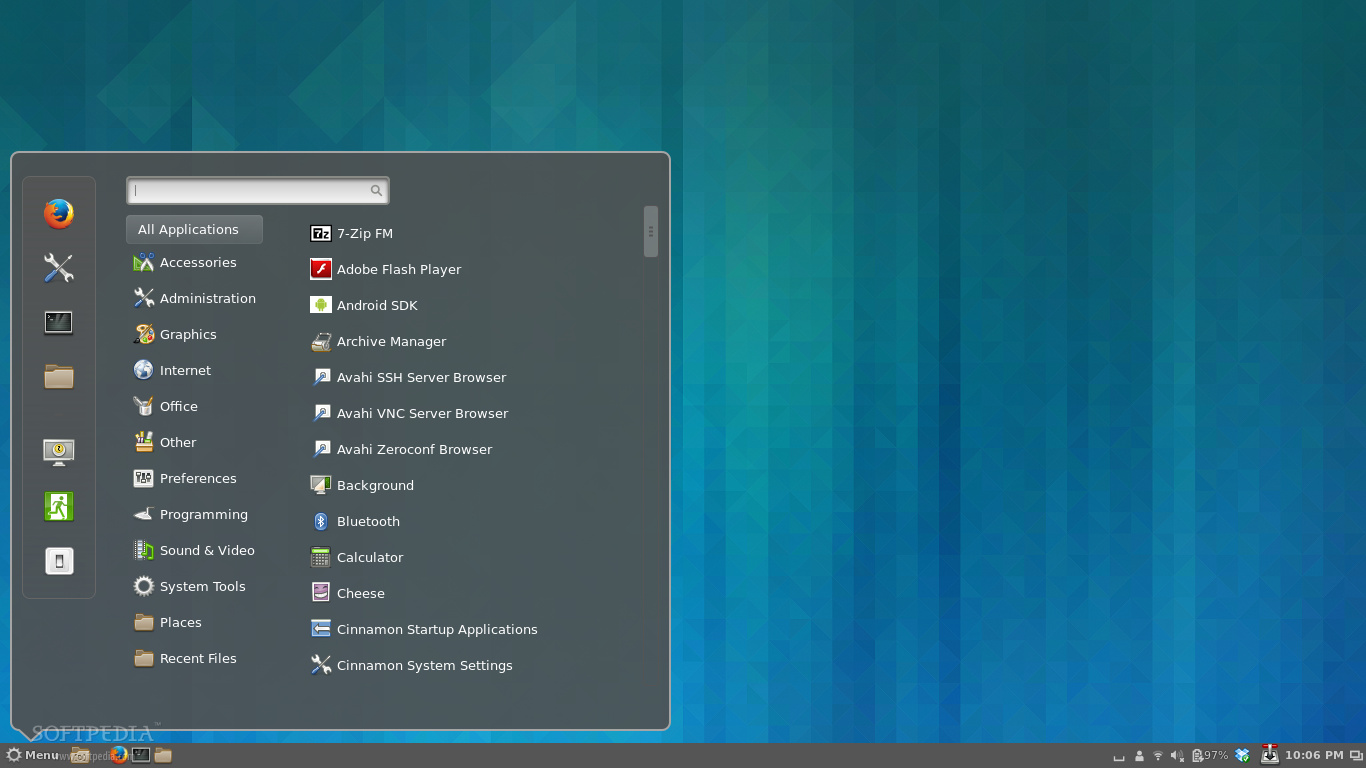
As you can see from the screenshot above, the Cinnamon 2.0 desktop environment is easily customizable, allowing users to instantly get new themes from the Internet and apply them with a few mouse clicks.

I have to admit that I've never used the Cinnamon desktop environment before. Yes, I've tested a few Linux Mint distros that used Cinnamon, but that's all. And now, writing this piece of article straight from the new Cinnamon 2.0 desktop environment makes me want to stick with it and not go back to my brand-new GNOME 3.10 desktop.


Another cool thing I've noticed in the new Cinnamon 2.0 desktop environment is the fact that it offers a lot of cool options in the right-click context menu, as well as many configuration options to make it look the way you want it to be.

What else is new in Cinnamon 2.0? Well, a lot of things, such as new sound effects, which makes it more alive and fun, better user management, system tray support for file operations, an improved Nemo file manager, and a lot more other cool features for you to discover.

If you're using Arch Linux and Cinnamon as your main desktop environment, then you can upgrade your Cinnamon installation to version 2.0 right now, using the sudo pacman -Syu command in a terminal. Don't forget to restart your computer for the changes to be applied.


How's your Cinnamon 2.0 experience so far?
Read more ...

Ubuntu 13.10 vs. Ubuntu 13.04: Reasons to Upgrade

Ubuntu 13.10 (Saucy Salamander) is scheduled for launch on October 17, but users of the previous operating systems from Canonical are wondering why they should upgrade at all, given the fact that the new one doesn't seem to have too many features.

Ubuntu 13.10 desktop
Canonical has been focusing on quality and on improving the existing features rather than making any drastic changes. This meant that the last two versions of Ubuntu didn't have much to show for, at least on the surface.

Ubuntu 13.04 (Raring Ringtail) has been called boring, among other things, but people don't realize that a lot of work is put behind every release of Ubuntu, even if it's not accompanied by any major visual changes.

So, why should you upgrade to Ubuntu 13.10 if there won't be any noticeable changes for the average user? Although it might seem that almost nothing has changed, the truth is that a lot of things have been upgraded, and that's always a good thing (most of the time).

The most important is, of course, the new Linux kernel 3.11.x, which is now the latest stable version available at the time of the launch. It comes with support for more devices and hardware components, better power management, and a ton of other improvements.

Then there is the upgrade for GNOME. Canonical may sport the Unity desktop environment, but they still use a lot of GNOME packages. Ubuntu 13.10 (Saucy Salamander) now comes with applications from the 3.8 branch, which is excellent news, especially for the Ubuntu GNOME flavor.

The Smart Scopes are also a big improvement over the former Lens feature. They are a lot better integrated and provide more to-the-point answers.

The security settings have been overhauled and users now have a lot more control over the traffic made by the operating system. It's possible to stop any communications between your PC or laptop and Canonical servers.

Ubuntu 13.10 is also a cornerstone for the package format. Until now, all the apps available for the Ubuntu came in a deb format, but the user had to have the dependencies installed or they had to do it separately.

With the new Click format, all the dependencies are now available from the package itself, which in theory means that you won't find any software incompatible with your distribution, if the developers use the Ubuntu SDK.

Last but not least, Unity has also received a multitude of improvements and should work much better than in any of the previous versions of Ubuntu.

If all these reasons are not enough to make you upgrade, then you should wait for Ubuntu 14.04 LTS, but there is no guarantee that it's not going to “look” largely the same like Ubuntu 13.10.
Read more ...

Thursday, October 10, 2013

Antivirus Live CD 7.1-0.98 Can Clean Any Operating System

Antivirus Live CD, a 4MLinux fork including the ClamAV scanner that's designed for system admins who need a lightweight live CD with an antivirus scanner, is now at version 7.1-0.98.


The developers of Antivirus Live CD have been quite busy and have implemented updates on a regular basis, turning this software into a very powerful tool.

Antivirus Live CD 7.1-0.98 is based on 4MLinux 7.1 and ClamAV 0.98. According to the developers, the Live CD is designed for users who need a lightweight live CD which will help them to protect their computers against viruses.

Another important mention is that all partitions are mounted automatically during boot so that they can be scanned by ClamAV. The 4MLinux provides support for most filesystems, including btrfs, ext2, ext3, ext4, FAT, HFS, HFS+, jfs, Minix, NTFS, ReiserFS, and XFS.

According to the developers, Antivirus Live CD images are fully compatible with UNetbootin, which can be used to create a simple Antivirus Live USB.

ClamAV scanner in action


Read more ...
Designed By