Breaking News
Showing posts with label LINUX. Show all posts

Friday, April 25, 2014

‘Iris’ Is a Stylish Flat GTK Theme


Iris light gtk theme
Iris, in both its light and dark variants, is nothing if not on-trend. It adheres to the (increasingly clichéd, but still good looking) use of “flat” elements coupled with just a splash of a bold accent colour.
IRIS Dark GTK Theme for Linux
It’d be easy to compare it to Windows’ Modern UI or Apple’s iOS 7, but since neither OS has dibs on the minimal style, they merely popularised it, it’s an association that would undermine the effort and attention put into Iris by its author.
Both Iris Light and Iris Dark support Gtk 3.10 (including GNOME’s natty new header bars), Gtk 2 (using the Murrine engine), and elementary’s Granite. A Metacity window theme is also included.

Don’t Freak Out But It’s In Beta

If there’s a drawback to be had it’s that both themes are still in ‘beta‘. Yes, that means if you’re prone to table-flipping over minor inconsistencies or issues you will want to give it a miss.
For everyone else (read: the serene and sensible amongst you) Iris can give your desktop a dramatic overhaul. To try it out jump on over to DeviantArt using the links below, then install to your local theme folder and apply using an app like Unity Tweak Tool.
Don’t forget to let us know what you think of it in the comments. Any bugs you find can be reported on the project’sGitHub page.
Read more ...

Easily Change Color of Folder Icons in Ubuntu With This Tool

Ubuntu’s default folder icons are nice enough but their uniform orange appearance lacks personality.


To add a splash of vibrance we can use a small tool called ‘Folder Color’. It’s designed to work with Nautilus and can only be used with the default Ubuntu icon theme.

The name pretty much spells out its function: it lets you to change the colour of folders. With it you can make your essay documents folder red, your holiday photo directory yellow, and so on, with a simple right-click.


There’s really not an awful lot more to say about it. It’s not a separate icon theme and does not, yet, allow you to change the colour of the standard Home folder icons (Music, Photos, Documents, etc.).
Other than that it works as intended, has a fairly decent number of colour options available, and offers a handy link should you wish to ‘Restore to default’.
Installing Folder Color

While not a game-changing app Folder Color is nevertheless a useful tool to have if you ever fancy retooling your home folder to look like a rainbow.
The utility can be installed from a dedicated PPA using the command line and supports Ubuntu 13.10 and 14.04 LTS. 

sudo add-apt-repository ppa:costales/folder-color
sudo apt-get update && sudo apt-get install folder-color


After installation has completed you will need to log out and back (or restart Nautilus) before the right-click options are listed.
Read more ...

Audacious 3.5 Released!

Audacious is a free and open source audio player with a focus on low resource usage, high audio quality, and support for a wide range of audio formats. Audacious is the default audio player in Lubuntu.


New features and improvements being introduced in Audacious 3.5 include:

Support for Microsoft ASXv3 playlists.
OpenGL spectrum visualization.
New settings window for JACK output.
New audtool commands for working with multiple playlists.
Defalt tag format for MP3 files changed from APEv2 to ID3v2.3
Support for COVERART element in Ogg Vorbis tags.
And many bug-fixes.


More details can be found here
Read more ...

Upcoming Features of GNOME 3.14

GNOME (GNU Network Object Model Environment) is a desktop environment which is composed entirely of free and open-source software.


This is a list of new features planned for the upcoming Gnome 3.14 release.


Browse DLNA Media Servers in GNOME Photos

With this, Gnome want to turn GNOME Photos into a Digital Media Player that can browse DMSes on a local network.

Integrate PicasaWeb in GNOME Photos

GNOME Photos currently has support for Flickr and Facebook photos. Gnome plan to add PicasaWeb to the list of supported services.

Systemd for the user session

Gnome can use systemd to manage parts of the user session. This allows gnome-shell to do application matching more reliably.

Colour Tinting in GNOME Shell

Certain vision and cognitive problems are accommodated by tinting the view. The GNOME Shell magnifier has this functionality, but lacks a user interface.

Integrate Zimbra in GNOME
Zimbra is a groupware and email server that has a free software edition. Gnome plan to offer IMAP/SMTP, CalDAV and CardDAV to Evolution.

Gnome 3.14 will be released in September 2014.
Read more ...

Ubuntu 14.10 Named ‘Utopic Unicorn’


Utterly unsurpassed ungulates! Ubuntu 14.10 has been named the Utopic Unicorn!
Announcing the moniker on his blog in his traditional alliterative way, Canonical founder Mark Shuttleworth sets out the aim of the release
utopic-unicorn

What’s In a Name?

The word ‘Utopic‘ is derived from ‘Utopia‘ and is used to describe a community, society or project that has reached some a shared degree of progress or ‘ideal’. The Unicorn is an animal from mythology generally depicted as Equidae with a lone, long spiralled horn on their heads. 
Ubuntu 14.10 for servers and desktops is set for release in October 2014.
Read more ...

An amazing Chrome extension for modifying text in web images


Project Naptha

Project Naptha, a Chrome extension made by developer Kevin Kwok, uses optical character recognition technology whipped up by several sources—including Microsoft Research and Google—to automatically identify text in images on the web. The extension then gives you options to copy, translate or even modify the text, right there in your browser.
With Project Naptha, selecting text in images is as easy as highlighting words in, well, Word, and a simple right-click brings up the extension's options. Being able to copy text in imagery and paste it into a Google search or document seems like a highly useful feature indeed.
project naptha file access
Swing into the Chrome Web Store to pick up the extension, then head over to the Project Naptha website for the full backstory and—if you have the extension installed—a full demonstration of its abilities. Kwok hopes to expand the project to other browsers in the future.
Read more ...

Wednesday, April 23, 2014

Wine 1.7.17 Features Lots of Fixes for Games


 -

Alexandre Julliard announced a new development version of Wine, bringing some new features and many smaller fixes that should make a lot of gamers very happy.

The development version of Wine is still being updated and there are a lot loose ends to tie up before launching a new build. It's likely that we will get a new major release in the next few weeks.

Besides the normal fixes for various applications and games that are usually uploaded in the new releases, more implementations for the Task Scheduler have been added, C runtime has been made more compatible by sharing source files, a number of fixes in the Mac OS X joystick support have been implemented, and numerous fixes have been added.

Every Wine version usually features lots of smaller fixes for various applications and games. They might not be as exciting as the major features, but some users might find that their favorite software is finally working.

Wine 1.7.16 also brings bug fixes for the following Windows games and tools: Ogre3D, Counter-Strike 1.6, Marangatu, Team Fortress 2, Splinter Cell, Little Fighter 2, Half-Life 2, Tropico 3, Microsoft Money 2003, Age of Empires, Mafia 2, Brink, Black Dog Cribbage, Acclaim Re-Volt, Sins of a Solar Empire, Skyrim, Sid Meier's Pirates!, EVE Online, Borderlands 2, Battle.net, Patrician III, and Exile: Escape from the pit.

According to the changelog, Counter-Strike 1.6 no longer freezes before logging onto a server, Team Fortress 2 no longer freezes when the user has just started playing, the Artweaver 1.x properties tool window no longer fails to re-dock, the keyboard will now work in games launched from Steam when using the virtual desktop, Steam no longer reports inaccurate transfer speeds, and Source-based games are now working properly.

Wine (which stands for wine is not an emulator) can be usually found in every major repository, but only the stable version. You can easily install the development build of Wine with the help of a PPA. All you need to do is to open a terminal and enter the following commands (you will need to be root in order for it to work).

sudo add-apt-repository ppa:ubuntu-wine/ppa
sudo apt-get update
sudo apt-get install wine
Read more ...

How to Dual Boot Android 4.4.2 and Ubuntu for Phones


Ubuntu for phones in action

Testing Ubuntu for phones is now even simpler with an application that is capable of installing the new operating system from Canonical without having to delete Android. Getting a dual boot system in place will perhaps turn the attention of even more users towards the new open source platform for mobiles and tablets.

Canonical has a simple procedure explained on its website on how to install Ubuntu for phones, but that implies deleting Android and getting the new operating system in place. The Ubuntu developers have done a great job so far and the new OS is looking great, but if you decide to return to Android, you will need to delete Ubuntu and install Google’s OS. That means that you will have to set up the phone all over again, which can be bothersome.

Fortunately, there is a solution for this problem and it's called MultiROM Manager, an application developed by Vojtech Bocek. It's available on Google Play and will only work on Nexus 7 (2012 & 2013), Nexus 4, and Nexus 5.

On the other hand, Ubuntu Touch only works on Nexus 4 Phone (mako), Nexus 7 (2013) Tablet (flo), and Nexus 10 Tablet (manta), so unless you have one of these devices, you won't be able to safely do this procedure (it might work, but there are no guarantees and you might brick the device and/or lose all your data.)

First of all, you will need an unlocked phone, which shouldn't be a problem since you already have a Nexus device. You will also have to be root in Android so that you can install the operating system from inside the application itself.

A number of tools will be necessary for this work. First off all, you will need to install ADB (Android Debug Bridge), which is provided by Canonical along with some of its tools. You will have to run a few commands in a terminal:

sudo add-apt-repository ppa:phablet-team/tools
sudo apt-get update
sudo apt-get install ubuntu-device-flash

Now, you will need to download two packages, TWRP 2.7.0.0 and SuperSU binary, which will actually make you root. Copy the SuperSU binary zip to the phone's memory. Run this command to go to the bootloader:

sudo reboot bootloader

Unzip the TWRP files on your computer and install the images with the following command (replace recovery.img with the name of the file you have downloaded):

fastboot flash recovery recovery.img

Navigate from the bootloader menu to recovery and you will now have TWRP 2.7.0.0 in place. Run TWRP and install the SuperSU binary, followed by a reboot.

You now have root access in Android. Install MultiROM Manager, apply the patches, and download Ubuntu for phones. The application will ask for root access and the installation will go on smoothly. When you reboot you will be prompted with a small screen that allows you to choose what system you want to run. Choose Ubuntu and you are good to go.

Enjoy!
Read more ...

Elementary OS ‘Isis’ Demoed With Blistering Speed


With Ubuntu placing all of its eggs in a ‘convergence’ shaped basket in a long-term play aiming to bridge multi-device form factors with a consistent codebase and user experience (insert breath here) it’s left to smaller Linux distributions to push forward the more traditional desktop paradigm that most users are comfortable with.


Elementary OS is one of several distributions to be built on the Canonical-backed core of Ubuntu but spin off in a totally different direction. While not immune to the changing tide of computing habits (all OSes will have to face up to a reset in expectations from tablet devices) it’s not (yet, at least) trying to force pointer-led interaction through a finger-shaped hole.

Whether you feel their visual style owes a nod to the designers behind OS X or not, the engineering and development vision driving the project certainly follows in the vein of Apple. That’s not an insult; tying together disparate third-party projects into a unified and cohesive whole is hard to do. It’s something Ubuntu, oft-touted as the pinnacle of Linux usability, has never quite managed to pull off.
Elementary OS Ain’t Slacking


Some ingenious code allows the top panel to adapt based on the colour of the background wallpaper. “Unity does that”, you might say. But not like this. The smart matching is able to detect when you need a solid bar, when a transparent one would work best or when the text should be a lighter colour so that it’s legible.

The visual finesse extends to the ‘Switchboard’ settings app, which gains new transitions and toggle switches. Following GNOME’s lead, elementary developers are also pressing ahead with the ‘header bar’ approach, which combines both title bar and toolbars in a stylish and space efficient way.

Opinions aside one thing is clear: elementary is not slacking. If they can hone what’s demoed in the video above, and not shrug off the ‘sore thumb’ issue from LibreOffice, et al., expect to see a new name appear in the popular meme of ‘That’s it, I’m switching to…’.
Read more ...

How has the Press Reacted to Ubuntu 14.04?


ubuntu-desktop
Ubuntu 14.04 LTS Desktop
The release of Ubuntu 14.04 just before the Easter holiday arrived gave tech journalists and bloggers an extended period in which to play with the newest long-term support release.
But what did they make of it?

Press Reaction

The last few years have seen each successive release of Ubuntu greeted by fewer and fewer pixels (as opposed to column inches).
As an LTS, the recommended choice for home users and enterprise deployments alike, does 14.04 buck the trend?
‘Reviews from mainstream tech publications and news site are once again thin on the ground.’
In short: not really. Reviews from mainstream tech publications and news site are once again thin on the ground. Whether it’s that this release has little newsworthy to offer (outside of extended support and a few extras that only enthusiasts are likely to care about) or whether there’s an increasing weariness about covering an established product that has, by and large, remained a niche interest is not for me to postulate.
But while there’s no mention of the Trusty Tahr on the BBC News website or in the technology section of The Guardian, it didn’t arrive totally unnoticed. What press reaction there has been, has been positive.

Quote, Unquote

ZDNet offers up a detailed overview, describing the release as “solid and stable”. While noting that it features ‘no big changes’ the reviewer, Terry Ralph-Knight, goes on to declare Ubuntu as being “pretty hard to beat”. 
‘Terry Ralph-Knight of Zdnet declares Ubuntu 14.04 LTS as ‘hard to beat”
Over at TechRepublic Jack Wallen, in his concise overview, says Trusty ‘wows through subtlety‘.
Jon Gold of Network World conveys the salient changes with a slideshow. On the subject of improved HiDPI support Gold notes that this “could prove important as 4K screens begin to gain traction in the market.”
Tech site The Inquirer covers the release from the ‘Windows XP Alternative’ angle, but noted it is a ‘natty bit of kit in its own right’.
‘Other coverage tended to regurgitate the official Canonical press release’
Other coverage tended to regurgitate the Canonical press release that trumpets the lure for Windows XP users and businesses; touts the ‘optimised for multi-touch trackpads and touchscreen’ angle; and touches on the co-release of new 14.04-based tablet and phone builds.
Of these, Engadget and PCAdvisor cover the above points concisely, while Jon Brodkin of Ars Technica distills the essentials points in depth with added insight from an email conversation he had with Rick Spencer, VP of Engineering at Canonical.
The decision to refer to Ubuntu Touch as merely ‘Ubuntu’ (something that while technically true forgoes a distinction still warranted) confused a few reporters, with many inferring that the screenshots of the desktop version accompanying their articles is what will be shipping on tablets later this year.
As we have previously reported, the ‘Unity 8′-based version of Ubuntu will be sold preinstalled on tablets from unknown OEMs later this year.
In all the reception has been positive, if a little lacking. But what critics think matters not a jot — it’s you, the user whose opinion is the true decider. Have you upgraded yet?
Read more ...

Sunday, October 20, 2013

Gnome-Shell Refined Is the First GNOME 3.10 Theme and It Looks Amazing


Gnome-Shell Refined 3.10 is probably the first theme made specifically for GNOME 3.10, and it looks great.


I say probably because it's hard to search the entire Internet for a GNOME 3.10-compatible theme, and my search hasn't been fruitful.

In any case, Gnome-Shell Refined 3.10 is a beta release and, as the name suggests, it only applies to GNOME Shell. It doesn't have any particular icons associated with it, but it makes the operating systems a lot classier.

“This is a beta state of a theme I made for my Gnome Shell. It is a Mixture of the VIVA-theme, the Elementary-Mod theme and the standard Shell theme.”

“All honors go to the makers of the themes mentioned above, I just mixed all! Because I'm using Numix GTK very often, the Item-Activated color is a kind of orange,” stated the developer.

You can download the theme from gnome-look.org.
Read more ...

First Look at Cinnamon 2.0 on Arch Linux

After approximately five months of development, the final version of the highly anticipated Cinnamon 2.0 desktop environment, created by the people behind the popular Linux Mint operating system, has finally arrived today, October 10, 2013.


Cinnamon 2.0 is fully packed with brand new features, lots of improvements, and numerous bug fixes, which will definitely make users upgrade from the old and deprecated Cinnamon 1.8 desktop environment.


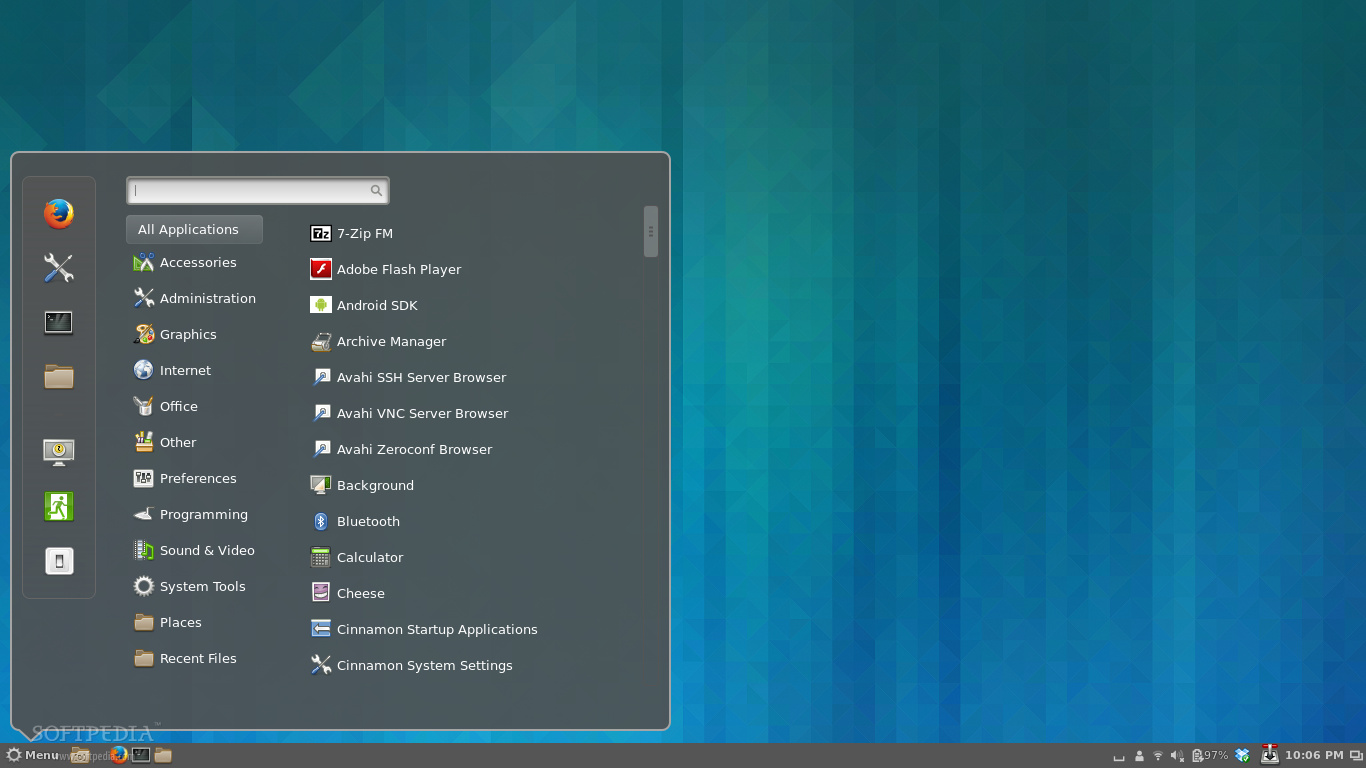
As you can see from the screenshot above, the Cinnamon 2.0 desktop environment is easily customizable, allowing users to instantly get new themes from the Internet and apply them with a few mouse clicks.

I have to admit that I've never used the Cinnamon desktop environment before. Yes, I've tested a few Linux Mint distros that used Cinnamon, but that's all. And now, writing this piece of article straight from the new Cinnamon 2.0 desktop environment makes me want to stick with it and not go back to my brand-new GNOME 3.10 desktop.


Another cool thing I've noticed in the new Cinnamon 2.0 desktop environment is the fact that it offers a lot of cool options in the right-click context menu, as well as many configuration options to make it look the way you want it to be.

What else is new in Cinnamon 2.0? Well, a lot of things, such as new sound effects, which makes it more alive and fun, better user management, system tray support for file operations, an improved Nemo file manager, and a lot more other cool features for you to discover.

If you're using Arch Linux and Cinnamon as your main desktop environment, then you can upgrade your Cinnamon installation to version 2.0 right now, using the sudo pacman -Syu command in a terminal. Don't forget to restart your computer for the changes to be applied.


How's your Cinnamon 2.0 experience so far?
Read more ...

Ubuntu 13.10 vs. Ubuntu 13.04: Reasons to Upgrade

Ubuntu 13.10 (Saucy Salamander) is scheduled for launch on October 17, but users of the previous operating systems from Canonical are wondering why they should upgrade at all, given the fact that the new one doesn't seem to have too many features.

Ubuntu 13.10 desktop
Canonical has been focusing on quality and on improving the existing features rather than making any drastic changes. This meant that the last two versions of Ubuntu didn't have much to show for, at least on the surface.

Ubuntu 13.04 (Raring Ringtail) has been called boring, among other things, but people don't realize that a lot of work is put behind every release of Ubuntu, even if it's not accompanied by any major visual changes.

So, why should you upgrade to Ubuntu 13.10 if there won't be any noticeable changes for the average user? Although it might seem that almost nothing has changed, the truth is that a lot of things have been upgraded, and that's always a good thing (most of the time).

The most important is, of course, the new Linux kernel 3.11.x, which is now the latest stable version available at the time of the launch. It comes with support for more devices and hardware components, better power management, and a ton of other improvements.

Then there is the upgrade for GNOME. Canonical may sport the Unity desktop environment, but they still use a lot of GNOME packages. Ubuntu 13.10 (Saucy Salamander) now comes with applications from the 3.8 branch, which is excellent news, especially for the Ubuntu GNOME flavor.

The Smart Scopes are also a big improvement over the former Lens feature. They are a lot better integrated and provide more to-the-point answers.

The security settings have been overhauled and users now have a lot more control over the traffic made by the operating system. It's possible to stop any communications between your PC or laptop and Canonical servers.

Ubuntu 13.10 is also a cornerstone for the package format. Until now, all the apps available for the Ubuntu came in a deb format, but the user had to have the dependencies installed or they had to do it separately.

With the new Click format, all the dependencies are now available from the package itself, which in theory means that you won't find any software incompatible with your distribution, if the developers use the Ubuntu SDK.

Last but not least, Unity has also received a multitude of improvements and should work much better than in any of the previous versions of Ubuntu.

If all these reasons are not enough to make you upgrade, then you should wait for Ubuntu 14.04 LTS, but there is no guarantee that it's not going to “look” largely the same like Ubuntu 13.10.
Read more ...

Thursday, October 10, 2013

Nvidia: SteamOS Will Redefine the Living Room Experience

Nvidia explained the extent of its involvement in Valve's SteamOS project and has outlined its expectations from the new operating system.


Valve has just published some of the preliminary hardware configurations for the upcoming Steam Machines, which will be running the SteamOS Linux-based operating system.

Even if Valve has yet to mention whether SteamOS will be something built from scratch or it's using another, already well-established distribution, such as Ubuntu.

An Nvidia representative, a member of the Linux team at Valve, has provided some interesting answers regarding the collaboration between the two platforms.

“When the SteamOS and Steam Machine projects first got going at Valve, everyone from NVIDIA showed a ton of excitement and wanted to get involved. It was a very collaborative effort as folks just started tackling issues such as driver support, porting ’NVIDIA’s content library, and more,” said Mike Sartain from Nvidia.

Nvidia has said no to the opportunity to provide GPUs for the new PlayStation, which is slated to arrive in just a couple of months, citing different interests for the company. It never said what those interests were, but Steam Machines seems like the perfect reason.

“It has the potential to redefine the living room experience. Also, both companies are very interested in collecting gamer feedback during pre-production, including them in the design process. It’s a chance to innovate in a way that doesn’t come along too often,” Sartain also said .

It seems that, for now, Nvidia and Valve are just dipping their toes and are trying to ascertain what the perfect combination of hardware is to provide the optimal experience for the SteamOS gamers.

The Steam Machines have been announced by Valve as its first attempt at building a PC/console that features a Linux-based SteamOS, which is capable of running both Linux, Windows, and Mac Games, and which should provide fierce competition for the consoles in the living room.
Read more ...

Antivirus Live CD 7.1-0.98 Can Clean Any Operating System

Antivirus Live CD, a 4MLinux fork including the ClamAV scanner that's designed for system admins who need a lightweight live CD with an antivirus scanner, is now at version 7.1-0.98.


The developers of Antivirus Live CD have been quite busy and have implemented updates on a regular basis, turning this software into a very powerful tool.

Antivirus Live CD 7.1-0.98 is based on 4MLinux 7.1 and ClamAV 0.98. According to the developers, the Live CD is designed for users who need a lightweight live CD which will help them to protect their computers against viruses.

Another important mention is that all partitions are mounted automatically during boot so that they can be scanned by ClamAV. The 4MLinux provides support for most filesystems, including btrfs, ext2, ext3, ext4, FAT, HFS, HFS+, jfs, Minix, NTFS, ReiserFS, and XFS.

According to the developers, Antivirus Live CD images are fully compatible with UNetbootin, which can be used to create a simple Antivirus Live USB.

ClamAV scanner in action


Read more ...

Tuesday, October 1, 2013

Ubuntu Studio 13.10 Beta 2 Brings In a New Wallpaper


The second and last Beta version of the upcoming Ubuntu Studio 13.10 Linux operating system was made available for download and testing on September 25, 2013, as part of the official Ubuntu 13.10 Beta release.
Being powered by a low-latency Linux 3.11 kernel, Ubuntu Studio 13.10 Beta 2 has almost the same features and functionality as the first Beta release, except for a new wallpaper, made by the Ubuntu Studio's artwork lead, Zak Frappan.
Ubuntu Studio 13.10 Beta 1 (Saucy Salamander) is distributed as a DVD ISO image, supporting both 32-bit and 64-bit architectures.
If you want to know more about the features brought by the Ubuntu 13.10 Beta release, or Xubuntu 13.10 Beta 2 and Kubuntu 13.10 Beta 2, don't hesitate to click on each one for a detailed report.

Download Ubuntu Studio 13.10 Beta 2 right now from Softpedia. Remember that this is a beta version and it should NOT be installed on production machines. It is intended for testing purposes only.
Read more ...
Designed By